Get in touch with Dreamland Playground Company


TL;DR: Compare digital waiver software on three things: what each signed record keeps, how staff find and export it, and what it connects to and what leaves with you on exit. This guide takes the operator’s side, with trampoline parks, indoor playgrounds and family entertainment centers as the examples.
Updated November 2026. Every vendor statement is the vendor’s own. Pricing pages, the Smartwaiver export article and ROLLER’s import page were read on 2026-11-19; all other vendor pages on 2026-11-20. A waiver tool captures consent; it doesn’t guarantee a legal outcome.
What Digital Waiver Software Records Beyond the Signature
What is a digital waiver?
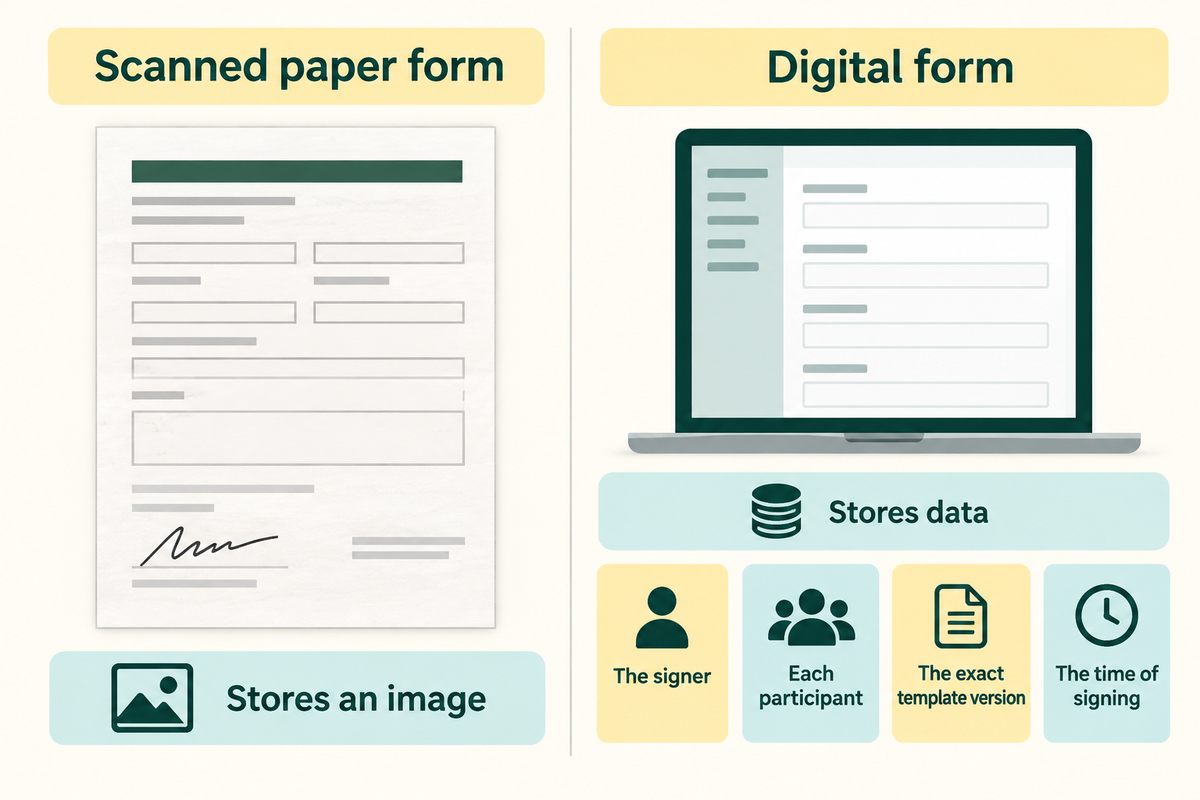
A digital waiver is a consent or liability form, signed electronically and saved as a record instead of a paper page. Digital waiver software saves a signed record which must show four things in the future: the signer, each participant, the exact template version the signer saw, and the time of signing. Check the four items on a waiver test before buying. Digital signatures, like hand-drawn ones, don’t on their own show the template version signed by the signer or which participants the waiver covers.
Smartwaiver says it adds a verified e-signature, time stamp, audit trail and secure WaiverVault storage (vendor-stated). wakesys says every waiver is stored with a SHA-256 hash, signature checksum, versioned text and PDF (vendor-stated). To create your own, load your waiver text into a template, or let a vendor convert it: Smartwaiver says its team can build a digital version of a current paper waiver, often within one business day (vendor-stated).
Liberty University’s own electronic signature guidance asks that tools can reproduce the exact version of the form shown to the signer at signing, with the signature and acknowledgment. Where another law requires a record to be retained, the E-SIGN Act (15 U.S.C. 7001(d)(1), 2023 U.S. Code) says that requirement is met by an electronic record that accurately reflects the information and stays accessible to those entitled to it, in a form that can be reproduced accurately.
Without a stored version, the system cannot show which wording a guest saw before the template was edited. A paper waiver on a clipboard ties a signature to whichever sheet was printed that day, while an online waiver form can tie the agreement to a stored template version. Scanned paper forms store an image; digital forms store data. Ask which extras, such as an ID upload, photo consent forms or medical waiver forms, are optional and what each one adds to the record. The same record is sometimes sold as a digital release or an online release.
The four fields apply to digital waivers for every industry, from adventure businesses to a gym, not just play venues. For the legal side of a release of liability, read what a waiver does and does not cover.
Signer Roles, Minors and Template Versions
One parent can sign for multiple children when the tool connects one signer to each child’s name on a single release form. Smartwaiver, WaiverFile and WaiverSign each say they support this (vendor-stated). Staff still has to find each child by name as they enter.
Party Center Software says the link sent in advance lets guests sign before they arrive. wakesys says the party host provides one link and ROLLER says walk-ins can sign either via QR code or at a kiosk (vendor stated). A host who wants to collect signatures before guests arrive sends the waiver link, and each guest can sign online on a phone. Every waiver signing route should make each guest’s separate signed waiver searchable in one place, so staff can collect digital waivers and look them up there.
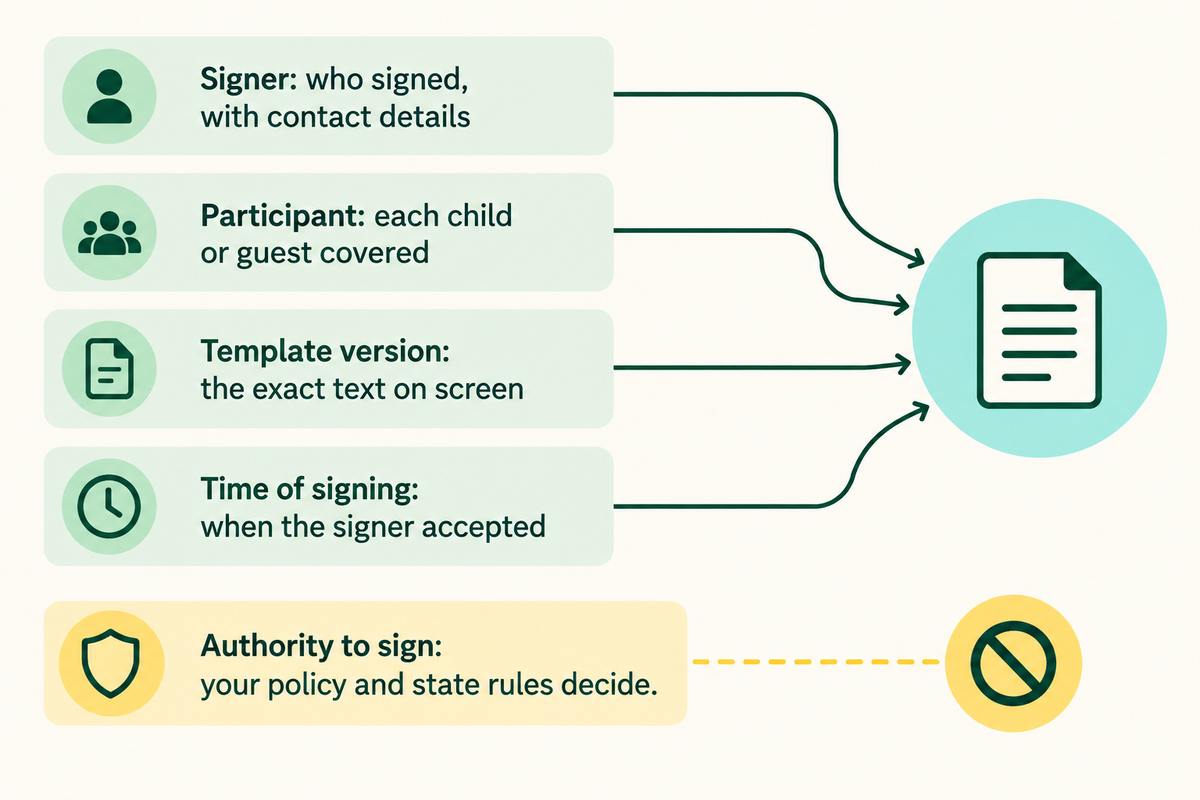
| Link | What the record must show | Check on a test waiver |
|---|---|---|
| Signer | Who signed, with contact details | Open the record; read the signer’s name and email |
| Participant | Each child or guest the waiver covers | Search by the child’s own name as well as the adult’s |
| Template version | The exact text on screen at signing | Edit one of the waiver templates, then open an older record and confirm the old text |
| Time of signing | The date and time the signer accepted the waiver | Compare the time stamp with when you signed the test waiver |
| Authority to sign | Whether this adult may sign the liability waiver for this child | Not applicable: your policy and state rules decide |
Florida is one state’s example. Pursuant to Florida Statutes 744.301(3) (2026), natural guardians can waive a minor’s claims in advance against a commercial activity provider for inherent risks. To be enforceable, the waiver must, at a minimum, include a prescribed statement in uppercase type at least 5 points larger than the rest of the text. Other states vary, so have an attorney review your wording; this is not legal advice. This isn’t legal advice. The software records who signed for whom but can’t confirm if the signer is a child’s legal guardian.
Finding and Exporting Signed Waivers With the Sibling-Search Drill
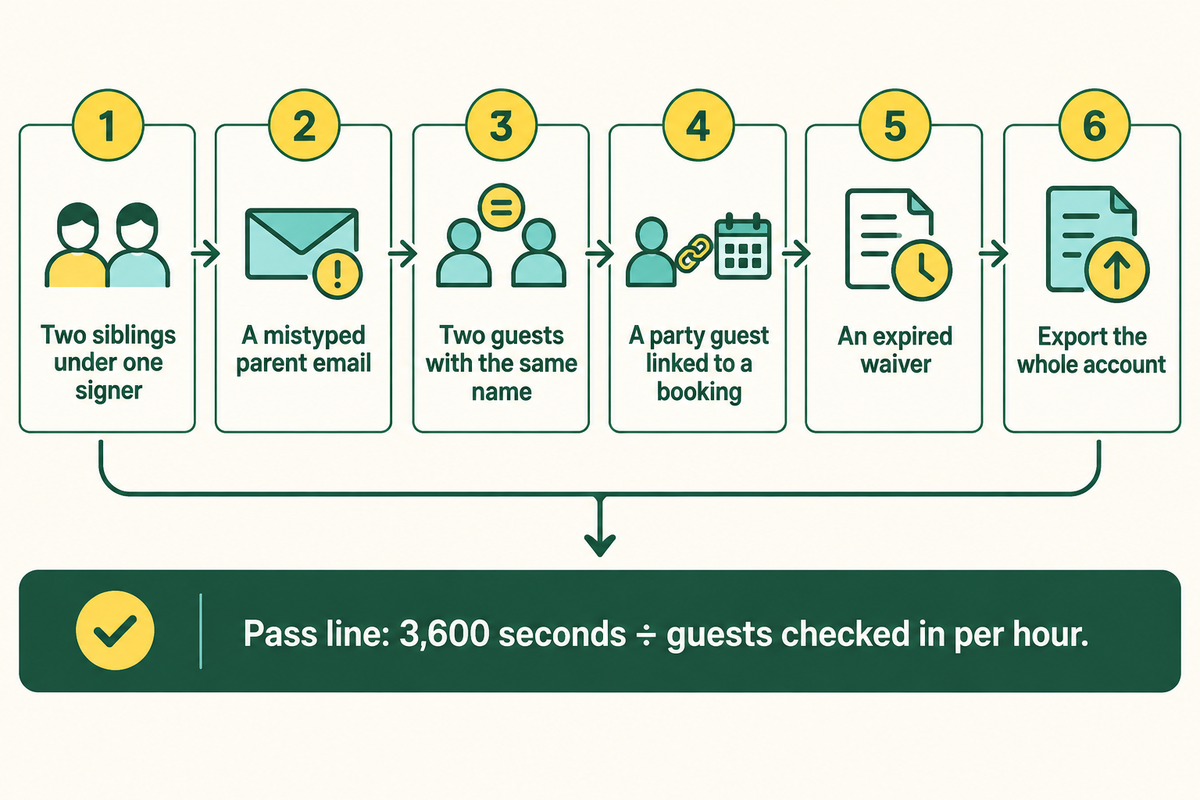
To check if staff can find and export a signed waiver, do this guide’s Sibling-Search Drill during the free trial. It uses five test scenarios, and in each, staff must return the exact signed version as a PDF within a time limit you write down first. Do it at renewal.
Digital waivers help a front desk only when staff can find them while a guest waits. Create the five records yourself with test names, and run the drill from the dashboard staff use to manage digital waivers at the check-in desk, not from a vendor demo account.
- Two siblings under one signer: search the online database by each child’s name. Both records show the same signer and the correct template version.
- A mistyped parent email: find the waiver by the child’s name or phone number.
- Two guests with the same name: differentiate them by date, phone number or signer.
- A party guest linked to a booking: open the waiver from the booking.
- An expired waiver: show its status and the version signed before the template last changed.
- Export the whole account, then open the files on a computer that is not logged in to the vendor.
Pass line: Every case shows the exact signed version and produces a PDF within your pass time. Set it based on your busiest hour: 3,600 seconds ÷ guests checked in per hour. Suppose a venue checks in 120 guests per hour: 3,600 ÷ 120 = 30 seconds per guest, so a case that takes longer fails. A file that opens isn’t the same as records that still link each signer to each child and to the template version they signed. Test the exported file before signing.
Smartwaiver exports signed waivers to CSVs, filtered by a date range, waiver title or tag. You can also download individual signed waivers as PDFs, according to the vendor.
The UK government’s purchasing guidance (updated 2026-09-03; general technology buying, not waiver-specific) says a product trial should try to solve one small but hard problem. It also says to test integrating the product with your current products. Once a tool passes, keep consent records in the operations file.
How long should signed waivers be kept?
Ask your insurer and lawyer how long to retain them, and verify the vendor’s retention time is the same. Waiver Electronic says signed waivers are stored indefinitely on paid plans, and WaiverForever says it keeps historical waivers forever (both vendor-stated).
Standalone Waiver App or Built-In Booking Module
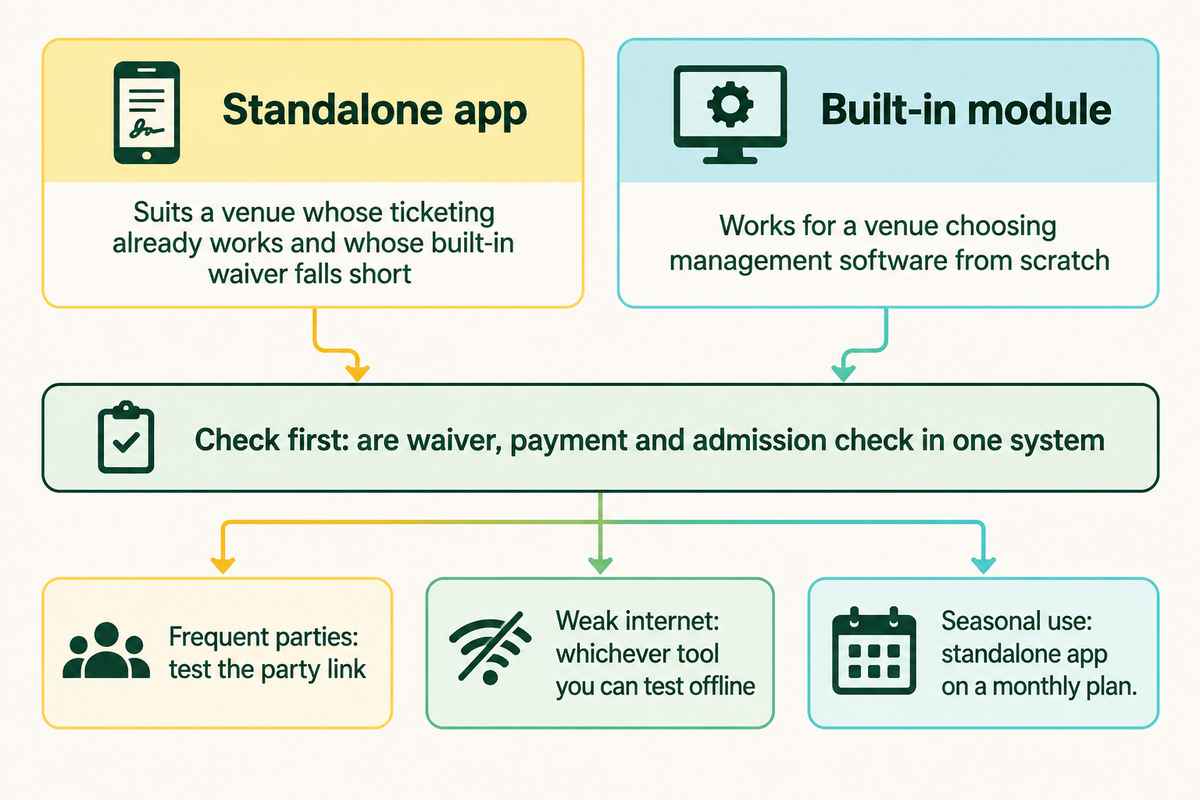
A standalone waiver app suits a venue whose ticketing already works and whose built-in waiver falls short. A built-in module works for a venue choosing management software from scratch. Either way, check first whether waiver, payment and admission check are in one system or whether staff need to switch pages or apps in the check-in workflow.
Each of the vendors ROLLER, CenterEdge and wakesys states that waivers are checked at the point of sale or at check-in (vendor-stated). The table below, Standalone-or-Built-In Decision Table shows routes to take based on ten venue scenarios. The “built-in is the default” view is from vendors that sell integrated platforms. Even Waiver Electronic, itself a vendor, says Square users may not always need separate waiver software (vendor-stated).
| Situation | Better route | Check first |
|---|---|---|
| New venue choosing a platform | Built-in module | One system holds waiver, payment and admission check, which can simplify handoffs |
| Happy with current ticketing and POS | Standalone app if the built-in waiver falls short | Staff manage online liability waivers without retyping guest names |
| Frequent parties | Either; test the party link | A host sends a link and each waiver attaches to the booking |
| Mostly walk-ins | Either, with a mobile-first form | A QR code that can speed up check-in: time one guest from scan to signed |
| Weak internet | Whichever tool you can test offline | A guest can sign a waiver and check in offline; the record syncs later |
| Small venue, simple admissions | Standalone app on a low tier | Monthly signed waivers against the plan allowance (see the cost table) |
| Complex memberships and capacity | Built-in module | Waiver status gates membership and session entry in the same record |
| Multi-site | Either, on one shared account | Whether one search covers every site and whether each site exports on its own |
| Kiosk for every guest | Either, with a kiosk app | Which iPads or Android tablets run it, and what a lost connection does |
| Seasonal use | Standalone app on a monthly plan | Records stay exportable after you stop paying |
Venues planning an opening can start with planning an indoor playground opening.
Integrations and an Exit Plan for Your Records
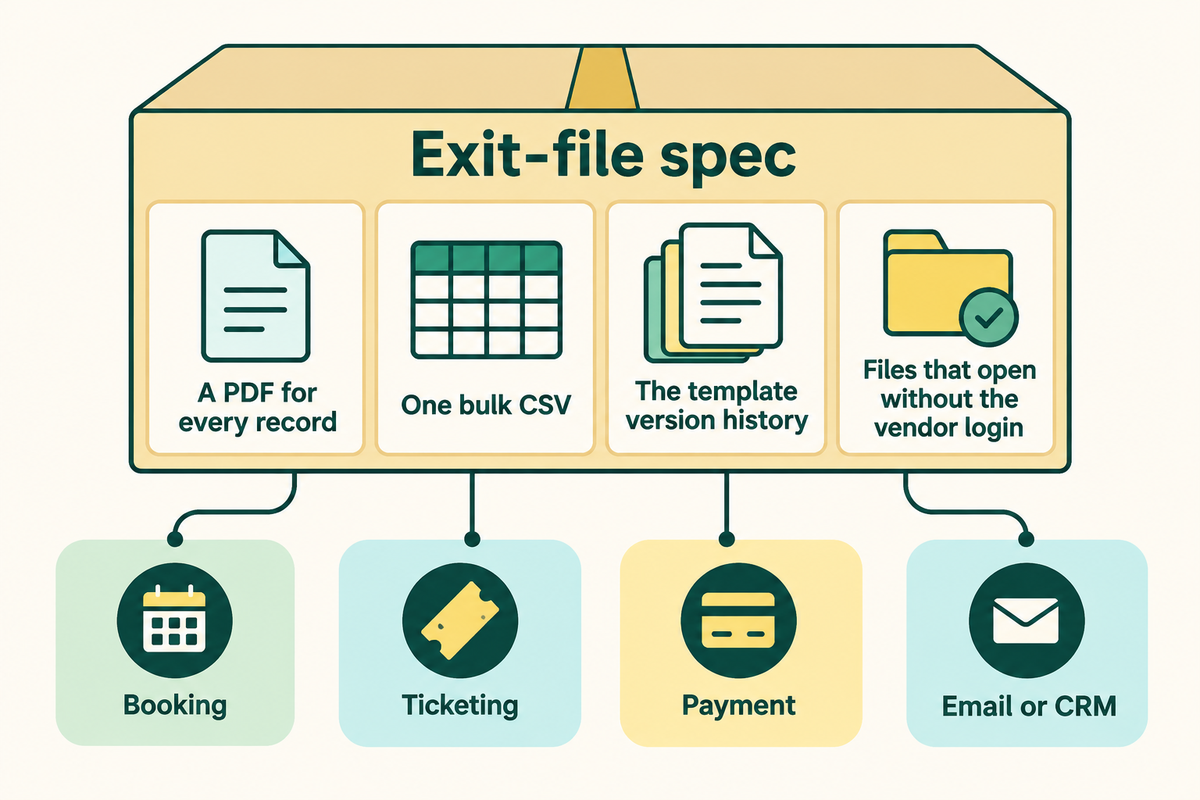
Choose a waiver tool that connects your booking, ticketing, payment and email or CRM systems and provides an API or Zapier, and then write an exit-file spec into the contract, a best practices step for any vendor that holds guest records. It lists a PDF for every record, one bulk CSV, the template version history, and files that open without needing the vendor login.
Check that guests who complete waivers online show as signed in the booking, and that the guest form and staff mobile app run on iOS and Android. Online reservations should retain signed status. For a suite level choice, see the full indoor playground software buying guide.
Put your security expectations in writing in contracts with service providers. Then, don’t just take their word for it — verify compliance.
Write into the contract how the vendor holds guests’ data securely, and check it. Signatures do not always travel with imported records, so ask what the next system keeps before you migrate.
The UK government’s cloud guidance (updated 2026-09-03; general guidance for cloud services, not waiver-specific) says to choose software-as-a-service products that use open standards and formats, so you control your data. It also says an exit strategy should balance the impact of changing provider against the benefit of staying.
Exit windows vary by plan. On Smartwaiver’s one-time-event plans, the help article says each plan can export everything gathered within its 14 days, and the account is deleted within 30 days of deactivation, waiver templates and signed waivers included (vendor-stated).
WCAG 2.2 success criterion 3.3.4 (Level AA) asks that pages that create legal commitments allow users to reverse, check, or confirm a submission. It is a technical standard, not a legal ruling for private operators. The web guidance of the Department of Justice lists labels, clear instructions, and error indicators as examples for online forms. It says businesses have flexibility in how they comply but must comply.
Digital Waiver Software Cost and the Cost-per-Signed-Waiver Table
At full use, the plans compared here cost between $0 and $0.220 per signed waiver: $0 on a free plan and $0.082 to $0.220 on Smartwaiver’s monthly plans (vendor figures). At half use the range runs from $0 to $0.440. To figure out what waivers for your business really cost, divide a plan’s price by the waivers you actually collect.
How much does Smartwaiver cost?
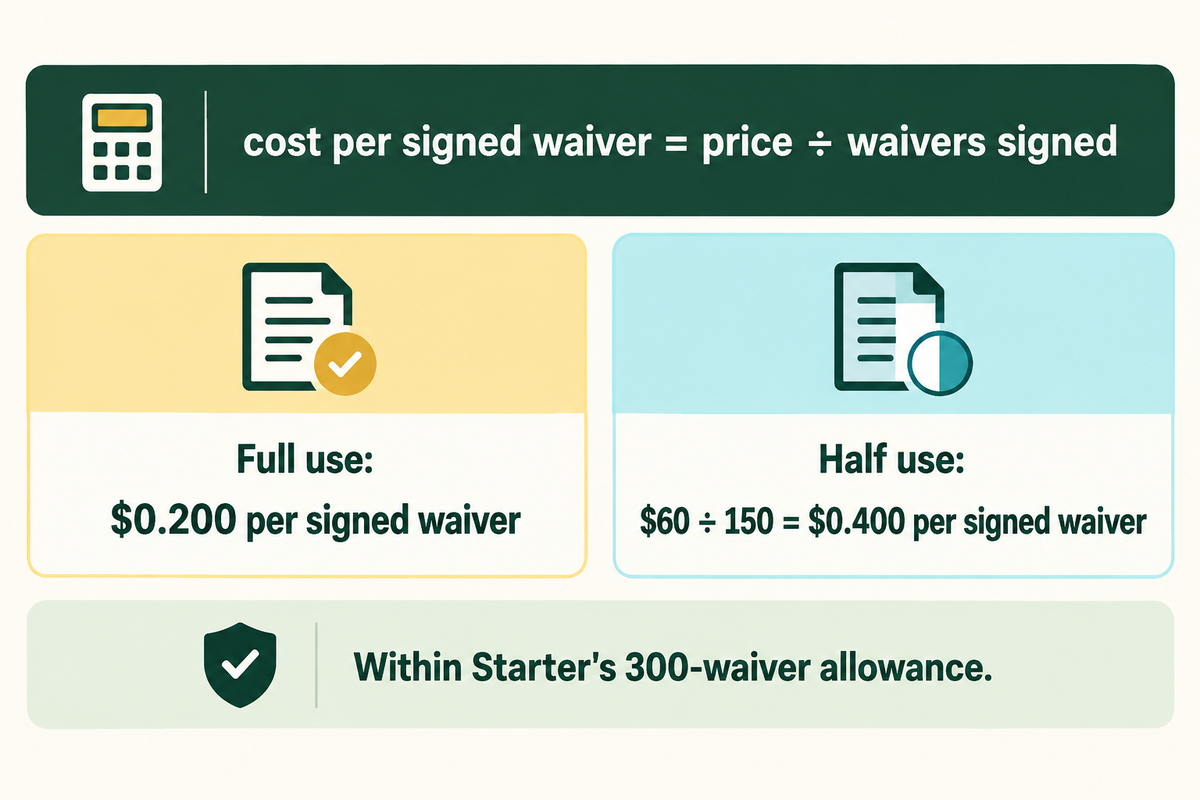
Smartwaiver costs $22 to $205 a month for 100 to 2,500 waivers, or $210 to $2,029 a year (vendor-stated, price page). The Cost-per-Signed-Waiver Table uses one formula: cost per signed waiver = price ÷ waivers signed. Full use is the monthly allowance, half use is half of it, and annual prices are divided by 12 first.
| Plan | Billing | Price | Waivers a month | Full use | Half use |
|---|---|---|---|---|---|
| Smartwaiver Basic | Monthly | $22 | 100 | $0.220 | $0.440 |
| Smartwaiver Basic | Annual | $210 ($17.50 a month) | 100 | $0.175 | $0.350 |
| Smartwaiver Starter | Monthly | $60 | 300 | $0.200 | $0.400 |
| Smartwaiver Starter | Annual | $575 ($47.92 a month) | 300 | $0.160 | $0.319 |
| Smartwaiver Business | Monthly | $160 | 1,000 | $0.160 | $0.320 |
| Smartwaiver Business | Annual | $1,580 ($131.67 a month) | 1,000 | $0.132 | $0.263 |
| Smartwaiver Premium | Monthly | $205 | 2,500 | $0.082 | $0.164 |
| Smartwaiver Premium | Annual | $2,029 ($169.08 a month) | 2,500 | $0.068 | $0.135 |
| WaiverForever free plan | Free | $0 | 20 submissions | $0 | $0 |
| Waiver Electronic free trial | 15 days | $0 | Not applicable | Not applicable | Not applicable |
Suppose a venue signs 150 new waivers a month, within Starter’s 300-waiver allowance: $60 ÷ 150 = $0.400 per signed waiver, double the $0.200 at full use.
The per-waiver math fits only plans priced by waiver allowance. wakesys charges a percentage of payments (2% up to $250,000 a year, 1% above) and CenterEdge lists $300 a month for 1–3 workstations when bundled with CenterEdge Payments (vendor-stated), so neither gets a row.
Is there a free digital waiver app?
Yes, for low volume: WaiverForever’s free plan gives 20 submissions a month (vendor-stated, free-plan page). Past 20, its pre-paid packs cost $9.99 for 100 ($0.0999 a submission). The page lists CSV or PDF export, Zapier and API without saying whether the free plan includes them, so run the drill’s export step before relying on it. Waiver Electronic offers a 15-day free trial (price page).
Waiver Software Tools Grouped by Vendor Family
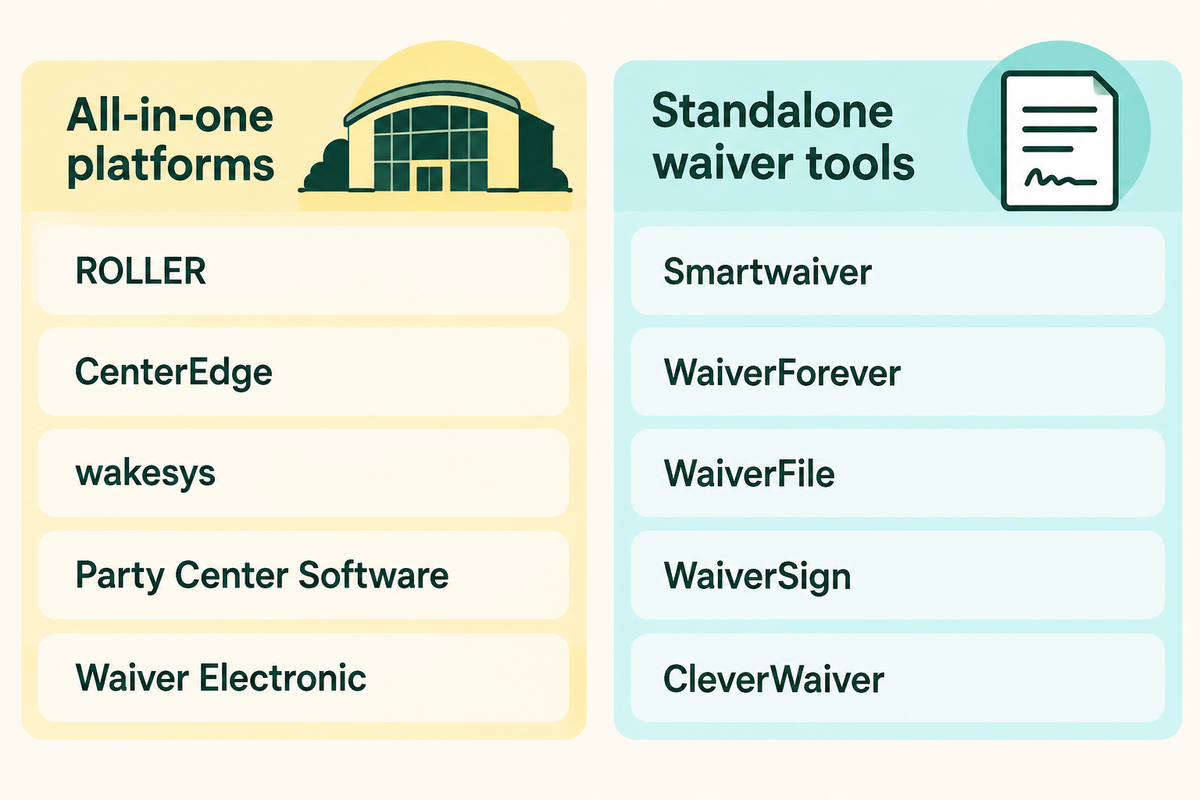
Before you shortlist an online waiver solution for businesses like yours, sort the options into two families: all-in-one platforms that include waivers, and standalone waiver tools that connect to your other systems. The matrix groups 10 vendors by family and lists what each says it stores or connects to.
Pick two that best align with your use case and business needs, and run them through the drill.
| Product | Family | What the vendor says it stores or connects to |
|---|---|---|
| ROLLER | All-in-one venue platform | Vendor-stated: staff check and assign waivers at POS; walk-ins sign by QR code or kiosk |
| CenterEdge | All-in-one venue platform | Vendor-stated: waivers required and verified at check-in for one attraction or the whole park |
| wakesys | All-in-one venue platform | Vendor-stated: a guest without a waiver can’t be checked in until they sign; versioned text and PDF stored |
| Party Center Software | All-in-one venue platform | Vendor-stated: a link sent ahead lets guests sign before arrival |
| Smartwaiver | Standalone waiver tool | Vendor-stated: verified e-signature, time stamp, audit trail, WaiverVault storage; CSV and PDF export |
| WaiverForever | Standalone waiver tool | Vendor-stated: 20 free submissions a month; the page lists CSV or PDF export, Zapier and API |
| WaiverFile | Standalone waiver tool | Vendor-stated: the parent signs once and adds each child’s name on one form; zip export by date range |
| WaiverSign | Standalone waiver tool | Vendor-stated: one signer can sign for multiple minors at the same time |
| Waiver Electronic | All-in-one platform | Vendor-stated: an all-in-one business solution with an integrated booking system and CRM |
| CleverWaiver | Standalone waiver tool | Vendor-stated: search waivers by name, phone or signed date |
What Changed in Waiver Software Buying This Year
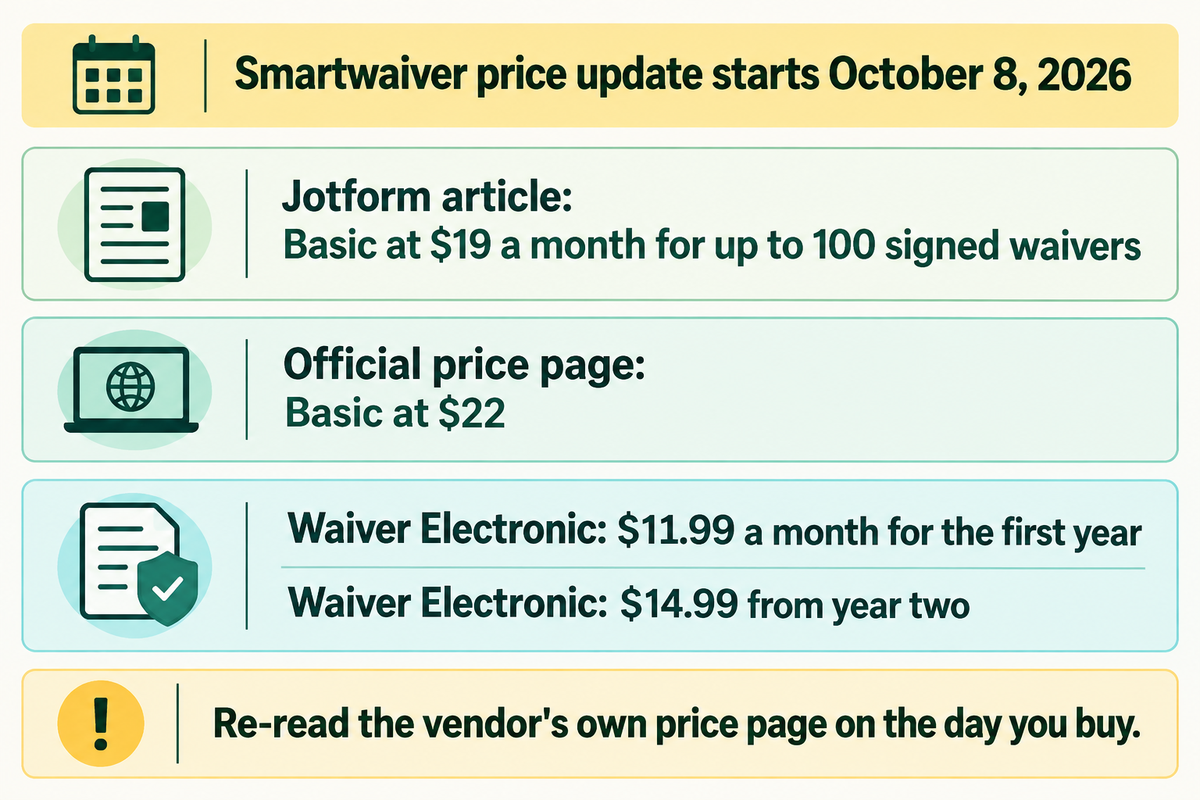
Online waiver software price pages drift. Smartwaiver’s price update starts October 8, 2026, its first in nearly four years (vendor notice). A Jotform blog article last updated August 17, 2026 still lists Smartwaiver’s basic plan at $19 a month for up to 100 signed waivers, while the official price page lists Basic at $22.
Waiver Electronic lists $11.99 a month for the first year and $14.99 from year two (vendor-stated). Re-read the vendor’s own price page and notice on the day you buy.
Frequently Asked Questions
What is a smart waiver?
Smart waiver is how Smartwaiver’s help center names a signed digital waiver; its export article speaks of “signed smart waiver data” (vendor-stated). Other vendors say digital or online waiver.
Whatever the label, the useful version stores the signer, each participant, the template version and the time as searchable fields instead of a scanned page. The four-field check in the first section shows whether a product’s record really works that way.
Are digital waivers legally binding?
An electronic waiver isn’t invalid just because it was signed electronically, but electronic form alone doesn’t make a specific waiver binding.
The E-SIGN Act, section 7001(a)(1) of Title 15 in the 2023 U.S. Code, says a signature or record in a covered commerce transaction may not be denied legal effect solely because it’s in electronic form. The provision says only that electronic form alone can’t defeat a waiver; it isn’t a finding on the enforceability of any specific waiver.
How much does Waiver Electronic cost?
Waiver Electronic lists its Basic plan at $11.99 a month for the first year and $14.99 a month from year two, for 70 waivers a month (vendor-stated).
At full use that’s $0.171 per signed waiver in year one ($11.99 ÷ 70) and $0.214 from year two ($14.99 ÷ 70). At half use it’s $0.343 and $0.428.
What is the best online waiver service?
Choose a standalone waiver app if your ticketing already works and its built-in waiver falls short, or a built-in module if you’re picking a platform from scratch. Then confirm the choice with the Sibling-Search Drill on your own test records, run during the free trials of two shortlisted tools.
Can imported waivers carry over to a new system?
Partly: ROLLER writes that signatures aren’t included in waivers imported to ROLLER, and it normally recommends having guests re-sign at their next ticket purchase (vendor-stated).
ROLLER’s help page puts importing at approximately 5–7 business days. Before you migrate, ask the next vendor in writing which fields it imports: signer, each participant, template version and time stamp. Then import a few records as a trial and compare them with the PDFs exported from the old system. A name and email without the signature or version is a contact list, not a waiver record.
Do I still need a lawyer to review the waiver text?
Yes: have a lawyer review the liability waiver wording for your state before you load it, because a software template is a starting point and state rules differ.
Florida’s statute above shows notice wording one state prescribes for a liability release that a parent signs for a minor. The software stores and versions the text you load and doesn’t check it. Ask your insurer too whether it sets wording or retention requirements.
Dreamland provides play equipment manufacturing and project planning support. It does not sell, build or certify waiver software, and it does not offer financing or marketing. If you are planning a venue, send your project city, floor plan, target customers, budget and current question.
References & Sources
- 15 U.S.C. 7001, General rule of validity (2023 U.S. Code), U.S. Government Publishing Office
- Electronic Signature Guidance, Information Services, Liberty University
- Florida Statutes 744.301, The Florida Legislature
- Define your purchasing strategy, GOV.UK
- Protecting Personal Information: A Guide for Business, Federal Trade Commission
- Managing technical lock-in in the cloud, GOV.UK
- Understanding Success Criterion 3.3.4: Error Prevention (Legal, Financial, Data), W3C Web Accessibility Initiative
- Guidance on Web Accessibility and the ADA, U.S. Department of Justice, ADA.gov